Common attributes
Every tag takes the base attributes below. The tag pages that follow list only what they add.
Common Base Attributes
| Attribute | Description |
|---|---|
| id | Unique identifier for anchoring. |
| display | Layout mode; valid values: "block", "relative", "flex". |
| margin | Shorthand for all margins; supports CSS-like values. |
| margin-x | Horizontal margins (left/right). |
| margin-y | Vertical margins (top/bottom). |
| margin-top | Top margin. |
| margin-right | Right margin. |
| margin-bottom | Bottom margin. |
| margin-left | Left margin. |
| padding | Shorthand for all paddings; supports CSS-like values. |
| padding-x | Horizontal padding (left/right). |
| padding-y | Vertical padding (top/bottom). |
| padding-top | Top padding. |
| padding-right | Right padding. |
| padding-bottom | Bottom padding. |
| padding-left | Left padding. |
| width | Element width; can be a number, "auto", "content", or a percentage (e.g., "50%"). |
| height | Element height; can be a number, "auto", "content", or a percentage. |
| align | Horizontal alignment; valid values: "left", "center", "right". |
| vertical-align | Vertical alignment; valid values: "top", "center", "bottom". |
| x | X-coordinate for relative positioning. |
| y | Y-coordinate for relative positioning. |
| spacing | Gap between items in flex layouts (number). |
| justify-content | Flex layout horizontal distribution; valid values: "flex-start", "flex-end", "center", "space-between", "space-around", "space-evenly". |
| align-items | Flex layout vertical alignment per line; valid values: "flex-start", "flex-end", "center", "stretch". |
| name | Optional element name for setting window names/identifiers. |
Display Flex - Deep Dive
Here we will cover more in details how display=flex works.
The main attribute you can use with display=flex:
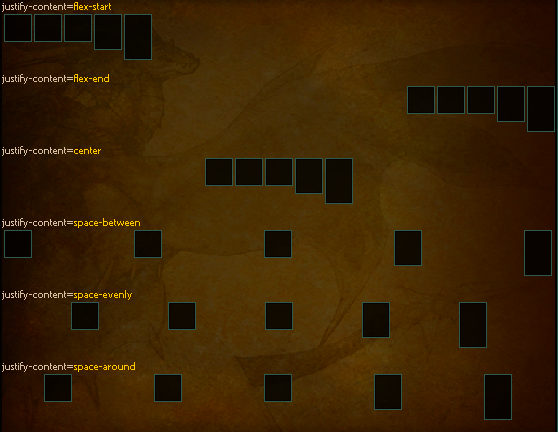
- justify-content which controls horizontal positioning.
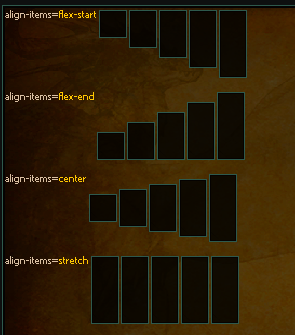
- align-items which controls the vertical alignment of elements in each row.
justify-content Examples
justify-content=<c color="wikititle">flex-start</c>
<inline width="auto" justify-content="flex-start">
    {% for i in range(5) %}
        <thin-board width="30" height="{{ 10 * (i+1) }}" />
    {% endfor %}
</inline>

<spacer></spacer>
justify-content=<c color="wikititle">flex-end</c>
<inline width="auto" justify-content="flex-end">
    {% for i in range(5) %}
        <thin-board width="30" height="{{ 10 * (i+1) }}" />
    {% endfor %}
</inline>

<spacer></spacer>
justify-content=<c color="wikititle">center</c>
<inline width="auto" justify-content="center">
    {% for i in range(5) %}
        <thin-board width="30" height="{{ 10 * (i+1) }}" />
    {% endfor %}
</inline>

<spacer></spacer>
justify-content=<c color="wikititle">space-between</c>
<inline width="auto" justify-content="space-between">
    {% for i in range(5) %}
        <thin-board width="30" height="{{ 10 * (i+1) }}" />
    {% endfor %}
</inline>

<spacer></spacer>
justify-content=<c color="wikititle">space-evenly</c>
<inline width="auto" justify-content="space-evenly">
    {% for i in range(5) %}
        <thin-board width="30" height="{{ 10 * (i+1) }}" />
    {% endfor %}
</inline>

<spacer></spacer>
justify-content=<c color="wikititle">space-around</c>
<inline width="auto" justify-content="space-around">
    {% for i in range(5) %}
        <thin-board width="30" height="{{ 10 * (i+1) }}" />
    {% endfor %}
</inline>
align-items Examples
<inline>
    align-items=<c color="wikititle">flex-start</c>
    <inline width="auto" align-items="flex-start">
        {% for i in range(5) %}
            <thin-board width="30" height="{{ 32 + 10 * (i) }}" />
        {% endfor %}
    </inline>

    <spacer></spacer>
    align-items=<c color="wikititle">flex-end</c>
    <inline width="auto" align-items="flex-end">
        {% for i in range(5) %}
            <thin-board width="30" height="{{ 32 + 10 * (i) }}" />
        {% endfor %}
    </inline>

    <spacer></spacer>
    align-items=<c color="wikititle">center</c>
    <inline width="auto" align-items="center">
        {% for i in range(5) %}
            <thin-board width="30" height="{{ 32 + 10 * (i) }}" />
        {% endfor %}
    </inline>

    <spacer></spacer>
    align-items=<c color="wikititle">stretch</c>
    <inline width="auto" align-items="stretch">
        {% for i in range(5) %}
            <thin-board width="30" height="{{ 32 + 10 * (i) }}" />
        {% endfor %}
    </inline>
</inline>