Filter groups
A filter group writes the picked value into the variable named by filter-target, which reloads the page or the reactive zones watching it.
filter-group.buttons
| Attribute | Requirement | Default | Constraints/Notes |
|---|---|---|---|
| Base Attributes | Optional | N/A | Inherits all common base attributes. |
| type | Required buttons | none | Defines the filter group type. |
| default | Required | none | Specifies the default filter value. Must be one of the <filter> values |
| filter-target | Required | none | Specifies the variable that the filter will set. |
Allowed Children: Only <filter type="button"> and <filter type="dynamic-button">.
filter.button
| Attribute | Requirement | Default | Constraints/Notes |
|---|---|---|---|
| Base Attributes | Optional | N/A | Inherits all common base attributes. |
| type | Required button | none | Filter type; should match parent group. |
| filter-value | Required | none | Value for filtering. |
| path | Required | none | Path template for visual states. |
| tooltip-text | Optional | none | Tooltip text for additional info. |
Parent Constraint: Must be placed inside a <filter-group type=buttons>.
path is expected to be a parametrized path to the images used for normal, over and clicked state.
UCHTML will then substitute normal hover and selected to the parameter of the string.
Example:
path="d:/ymir work/ui/example/group_b_{}.tga"
become
d:/ymir work/ui/example/group_b_normal.tga
d:/ymir work/ui/example/group_b_hover.tga
d:/ymir work/ui/example/group_b_selected.tga
And each of the images need to exist in order to render the button.
Code Example
<filter-group display="flex" justify-content="space-evenly" type="buttons" default="packed_query:GROUP_A"
    width="auto" filter-target="query:race">
    <filter type="button" path="d:/ymir work/ui/example/group_a_{}.tga" filter-value="packed_query:GROUP_A">
    </filter>
    <filter type="button" path="d:/ymir work/ui/example/group_b_{}.tga" filter-value="packed_query:GROUP_B">
    </filter>
    <filter type="button" path="d:/ymir work/ui/example/group_c_{}.tga" filter-value="packed_query:GROUP_C">
    </filter>
    <filter type="button" path="d:/ymir work/ui/example/group_d_{}.tga" filter-value="packed_query:GROUP_D">
    </filter>
</filter-group>

filter.dynamic-button
| Attribute | Requirement | Default | Constraints/Notes |
|---|---|---|---|
| Base Attributes | Optional | N/A | Inherits all common base attributes. |
| type | Required dynamic-button | none | Filter type; should match parent group. |
| filter-value | Required | none | Value for filtering. |
| text | Required | none | Text displayed on the button. |
| tooltip-text | Optional | none | Tooltip information. |
Parent Constraint: Must be placed inside a <filter-group type=buttons>.
Code Example
<filter-group display="flex" justify-content="space-evenly" type="buttons" default="foo"
    width="auto" filter-target="query:race">
        <filter type="dynamic-button" height=25 width="70" text="foo" tooltip-text="foo" filter-value="foo"></filter>
        <filter type="dynamic-button" height=25 width="70" text="bar" tooltip-text="bar" filter-value="bar"></filter>
        <filter type="dynamic-button" height=25 width="70" text="check" tooltip-text="check" filter-value="check"></filter>
</filter-group>

filter-group.list
| Attribute | Requirement | Default | Constraints/Notes |
|---|---|---|---|
| Base Attributes | Optional | N/A | Inherits all common base attributes. |
| type | Required list | none | Defines the filter group type. |
| default | Required | none | Specifies the default filter value. Must be one of the <filter> values |
| filter-target | Required | none | Specifies the variable that the filter will set. |
Allowed Children: Only <filter type=item>.
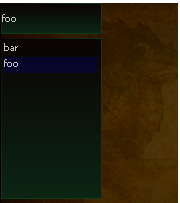
filter.item
| Attribute | Requirement | Default | Constraints/Notes |
|---|---|---|---|
| Base Attributes | Optional | N/A | Inherits all common base attributes. |
| type | Required item | none | Filter type identifier. |
| filter-value | Required | none | Value associated with the filter item. |
| text | Required | none | Display text for the item. |
| tooltip-text | Optional | none | Additional tooltip info. |
Parent Constraint: Must be placed inside a <filter-group type=list>.
filter-group.tabs
| Attribute | Requirement | Default | Constraints/Notes |
|---|---|---|---|
| Base Attributes | Optional | N/A | Inherits all common base attributes. |
| type | Required tabs | none | Defines the filter group type. |
| default | Required | none | Specifies the default filter value. Must be one of the <filter> values |
| filter-target | Required | none | Specifies the variable that the filter will set. |
Allowed Children: Only <filter type=tab>.
Code Example
<filter-group type="tabs" filter-target="query:tab" width="auto" default="info">
    <filter type="tab" height="25" width="100" padding="5" filter-value="info">
        <txt color="wikititle" align="center">Foo</txt>
    </filter>
    <filter type="tab" height="25" width="100" padding="5" filter-value="up">
        <txt color="wikititle" align="center">Bar</txt>
    </filter>
</filter-group>

filter.tab
| Attribute | Requirement | Default | Constraints/Notes |
|---|---|---|---|
| Base Attributes | Optional | N/A | Inherits all common base attributes. |
| type | Required tab | none | Filter type identifier. |
| filter-value | Required | none | Value used for filtering. |
| height | Required | none | Specifies the height of the tab. |
Parent Constraint: Must be placed inside a <filter-group type=tabs>.