Monster and chest tags
These tags read the wiki data of the data namespaces.
monster-stats
| Attribute | Requirement | Default | Constraints/Notes |
|---|---|---|---|
| vnum | Required | none | Monster identifier. |
| width | Required | none | Display width. |
| height | Required | none | Display height. |
| Base Attributes | Optional | none | Inherits all common base attributes. |
Code Example
<monster-stats width="auto" height=100 vnum=101 />

monster-card
| Attribute | Requirement | Default | Constraints/Notes |
|---|---|---|---|
| vnum | Required | none | Monster identifier. |
| tab | Optional | stats | The tab shown as default. Admitted values are stats and drop |
| Base Attributes | Optional | none | Inherits all common base attributes. |
This element internally uses
mob originwhich can be configured in theconfig.yaml.
Code Example
<monster-card vnum=101 />

monster-drop
| Attribute | Requirement | Default | Constraints/Notes |
|---|---|---|---|
| vnum | Required | none | Monster drop identifier. |
| width | Auto-set | "auto" | Forces auto width. |
| Base Attributes | Optional | none | Inherits all common base attributes. |
Code Example
<monster-drop width="auto" vnum=101 />

monster-spawn
| Attribute | Requirement | Default | Constraints/Notes |
|---|---|---|---|
| vnum | Required | none | Monster spawn identifier. |
| Base Attributes | Optional | none | Inherits all common base attributes. |
Code Example
<monster-spawn vnum=101/>

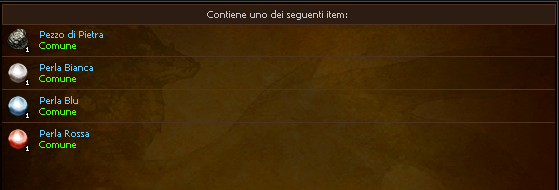
chest-content
| Attribute | Requirement | Default | Constraints/Notes |
|---|---|---|---|
| vnum | Required | none | Identifier for the chest content. |
| width | Auto-set | "auto" | Forces auto width. |
| Base Attributes | Optional | none | Inherits all common base attributes. |
Code Example
<chest-content width="auto" vnum="27987" />
chest-card
| Attribute | Requirement | Default | Constraints/Notes |
|---|---|---|---|
| vnum | Required | none | Identifier for the chest card. |
| Base Attributes | Optional | none | Inherits all common base attributes. |
This element internally uses
item originwhich can be configured in theconfig.yaml.
Code Example
<chest-card width="auto" vnum="27987" />
